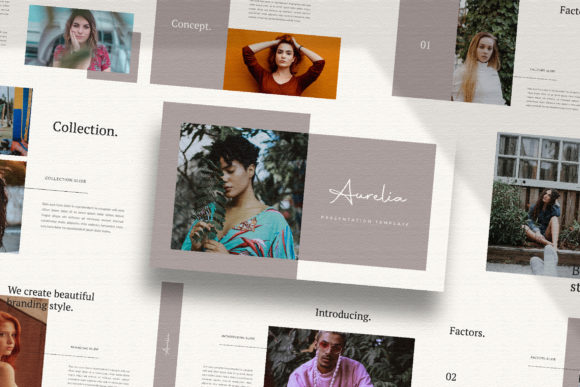
AURELIA - Google Slide Template
The AURELIA - Google Slide Template is a modern and versatile presentation tool designed for professionals and creatives who need a visually appealing and functional way to showcase their work. With its unique approach to slide design, it stands out from generic templates by offering a fresh and dynamic layout that adapts to various content types. Whether you're presenting a marketing campaign, a creative portfolio, or a business proposal, AURELIA provides a polished foundation that can elevate your message.
What Makes AURELIA Unique?
AURELIA is more than just a collection of slides—it's a thoughtfully crafted template that emphasizes visual storytelling. Unlike many other templates that rely on repetitive layouts, AURELIA features distinct slide designs that keep the audience engaged throughout the presentation. Each slide has a unique structure, making it ideal for projects that require a fresh and professional look without the risk of monotony.
The template also offers a high-resolution 1920x1080 pixel format, ensuring that your content looks sharp and clear on any screen. This level of detail is particularly important for digital media presentations, where visual quality plays a key role in conveying professionalism and attention to detail.
Key Features and Practical Value
One of the standout features of AURELIA is its ease of customization. The template is fully editable, allowing users to modify text, colors, and layouts without needing advanced design skills. The use of Slidemaster makes it simple to drag and drop images, giving presenters flexibility when incorporating visual elements into their slides.
The template includes a variety of layout options, including lookbook and magazine-style designs. These formats are especially useful for creative professionals, such as photographers, designers, or content creators, who want to showcase their work in an elegant and organized manner. The ability to switch between different styles ensures that the template can be adapted to a wide range of projects and industries.
AURELIA also supports automatic color changes based on the theme, which helps maintain visual consistency throughout the presentation. This feature reduces the time needed to manually adjust colors, making the design process more efficient. Additionally, the template uses free fonts, which eliminates the need for additional purchases and keeps costs low for users.
Usability and Flexibility
For users who may not have extensive experience with design software, AURELIA offers a user-friendly interface that simplifies the editing process. The inclusion of a help instruction PDF provides guidance on how to use the template effectively, making it accessible to both beginners and experienced presenters.
Despite its simplicity, AURELIA does not compromise on quality. The clean and minimal design allows the content to take center stage, ensuring that the message remains clear and impactful. This is especially beneficial for professionals who want to focus on delivering their message rather than struggling with complex formatting.
Another advantage of AURELIA is its adaptability. Whether you're preparing a pitch for a client, a business plan for investors, or a creative portfolio for potential employers, the template can be customized to suit your specific needs. Its versatility makes it a valuable asset for individuals across various industries and roles.
Who Benefits Most from AURELIA?
AURELIA is particularly well-suited for marketers, entrepreneurs, and creatives who need to present ideas in a visually compelling way. Its design-focused approach makes it ideal for those in the digital media and advertising fields, where aesthetics play a significant role in communication.
Small business owners and freelancers can also benefit from using AURELIA. The template allows them to create professional-looking presentations without the need for expensive design services. This can be especially helpful when pitching to clients or partners, as a well-designed presentation can make a strong first impression.
Additionally, educators and students may find AURELIA useful for academic presentations or project showcases. The clean layout and customizable features make it easy to organize information while maintaining a professional appearance.
Real-World Performance and Limitations
In practical use, AURELIA performs reliably across different devices and platforms. Its compatibility with Google Slides ensures that users can access and edit their presentations from anywhere, making it a convenient choice for remote work or collaborative projects.
However, it's worth noting that the template does not include actual images or photographs. Users are encouraged to source their own visuals from platforms like Unsplash or Pexels. While this provides flexibility, it may require additional effort for those who are not familiar with finding suitable stock images.
Another consideration is that the template is best suited for users who are comfortable with basic design adjustments. While it is user-friendly, some customization may require a basic understanding of design principles to achieve the desired outcome.
Conclusion and Recommendations
AURELIA - Google Slide Template is a strong choice for anyone looking to create visually engaging and professional presentations. Its unique slide designs, high-quality resolution, and ease of use make it a valuable resource for a wide range of users. Whether you're a marketer, designer, educator, or entrepreneur, AURELIA offers a flexible and reliable solution for your presentation needs.
If you're looking for a template that balances aesthetics with functionality, AURELIA is worth considering. Its clean design, customization options, and adaptability ensure that it can meet the demands of various projects and audiences. By taking advantage of its features, you can enhance the impact of your presentations and communicate your message more effectively.