VERA - Keynote Template: A Minimalist Media Presentation Solution
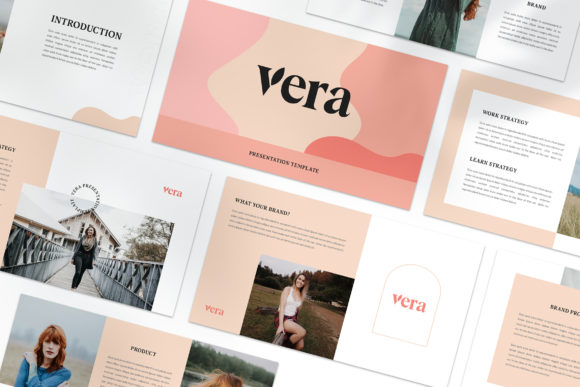
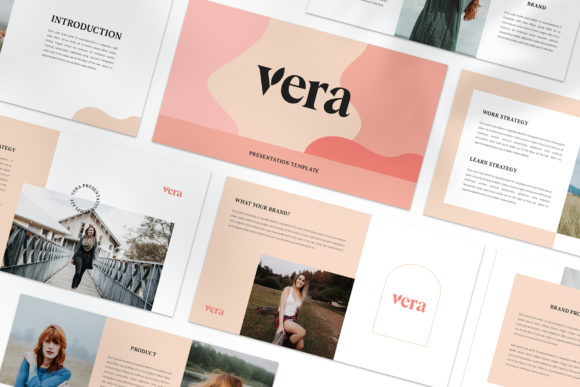
The VERA - Keynote Template is a modern, minimalist design intended for digital media, marketing, or professional presentations. Unlike traditional templates that rely on repetitive layouts, each slide in VERA is unique, offering a fresh and dynamic visual experience. This approach ensures that your presentation stands out while maintaining a cohesive and professional look.
Designed with versatility in mind, the VERA template caters to both personal and business projects. Whether you're presenting to clients, partners, or stakeholders, the template provides a clean and elegant foundation that can be adapted to various needs. Its focus on simplicity and functionality makes it an attractive option for those looking to create visually appealing slides without compromising on usability.
Key Features of VERA - Keynote Template
The VERA template includes several features that enhance its usability and adaptability. One of the most notable aspects is the high-resolution 1920x1080 pixel full HD format, ensuring that your content looks sharp and clear on any display. This resolution is ideal for presentations that require a professional appearance, especially when shown on larger screens or in high-definition environments.
A unique theme color is available, with automatic color change capabilities. This feature allows users to maintain a consistent aesthetic across all slides while easily adjusting the color scheme to match branding or personal preferences. The ability to customize colors enhances the template's flexibility, making it suitable for a wide range of industries and use cases.
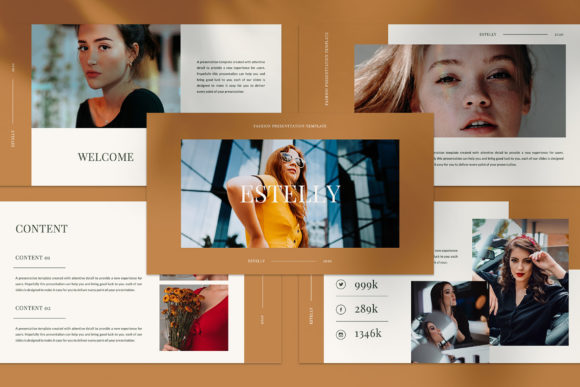
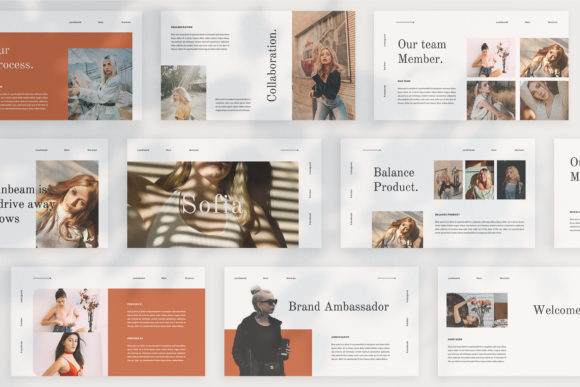
Another key feature is the variety of layout and text options. VERA offers multiple variations, allowing users to choose the best fit for their content. This includes lookbook and magazine-style layouts, which provide a more editorial feel compared to standard slide designs. These styles are particularly useful for presentations that aim to showcase creative work, portfolios, or storytelling elements.
The template is built using Slidemaster, a platform that simplifies the process of creating and editing slides. Users can simply drag and drop images into the template, making it easy to add visual elements without needing advanced design skills. This user-friendly approach reduces the time and effort required to prepare a presentation, making it accessible to a broader audience.
Benefits and Considerations
One of the main benefits of the VERA template is its ease of customization. The fully editable nature of the file allows users to modify text, images, and layouts to suit their specific needs. This level of control is valuable for professionals who want to maintain a unique brand identity while delivering polished presentations.
The use of free fonts also adds to the template's appeal, as it eliminates the need for additional font purchases. However, users should note that the template does not include actual photographs or images. Instead, it uses placeholder images for illustration purposes. Buyers are encouraged to source their own images from platforms like Unsplash or Pexels, which offer a wide selection of high-quality, royalty-free photos.
While VERA is well-suited for many presentation scenarios, there are situations where alternatives may be more appropriate. For example, users who require highly complex animations or interactive elements might find that other templates offer more advanced features. Additionally, those who prefer a more traditional or rigid layout structure may not find VERA’s unique slide designs to be the best fit.
Situations Where VERA Excels
VERA is particularly effective for presentations that emphasize visual storytelling or creative content. Its lookbook and magazine-style layouts are ideal for showcasing portfolios, product launches, or artistic projects. The minimal design also works well for business presentations where clarity and professionalism are priorities.
For individuals or small businesses, the VERA template provides a cost-effective solution that doesn’t require extensive design expertise. Its drag-and-drop functionality and straightforward customization options make it accessible to users with varying levels of technical skill. This makes it a strong choice for those who want to create impactful presentations quickly and efficiently.
When Alternatives May Be Better
While VERA offers a range of benefits, there are scenarios where other templates might be more suitable. For instance, users who need a more structured or data-driven presentation may find that templates with predefined slide types and charts are more practical. Similarly, those who require extensive animation or multimedia integration might benefit from templates designed with these features in mind.
It’s also important to consider the target audience when choosing a presentation template. If the audience expects a more traditional or formal style, a template with a classic layout might be more appropriate than VERA’s minimalist approach. Ultimately, the decision should be based on the specific goals of the presentation and the preferences of the presenter.
Practical Decision-Making Insights
When evaluating the VERA - Keynote Template, it’s helpful to consider the purpose of the presentation and the desired outcome. If the goal is to deliver a visually engaging and unique presentation, VERA is a strong candidate. However, if the focus is on data visualization, interactivity, or a more conventional layout, alternative templates may be more suitable.
Users should also take into account their level of design experience and the time available for preparation. While VERA is easy to customize, those unfamiliar with design tools may need to invest some time in learning how to make the most of its features. On the other hand, for those who are comfortable with design software, the template offers a great balance of flexibility and efficiency.
In summary, the VERA - Keynote Template is a versatile and aesthetically pleasing option for those looking to create professional, visually striking presentations. Its unique slide designs, customizable features, and user-friendly interface make it a valuable tool for a wide range of applications. By carefully considering the specific needs of the presentation, users can determine whether VERA aligns with their goals and delivers the desired results.